







High Contrast
Font Size
Medium
Small
Medium
Large
ENG
ENG
繁體
简体
About TWC

Undergraduate and Sub-degree Programmes
Postgraduate Programme

Programmes
-
Postgraduate ProgrammeBachelor’s Degree Programmes
-
Sub Degree ProgrammesDiploma Programme
-
Certificate Programme
 Administration Units
 News & EventsLibrary
Electronic Tools
EndNoteEndNote is a bibliographic management software package designed to help you organise bibliographic references and create a bibliography. EndNote allows you to search, retrieve relevant citations, and build your bibliography. The Library has subscribed to EndNote for all current TWC staff and students.
Terms of Use:To use EndNote, please read and confirm that you agree with the following terms of use before downloading the software for installation on your PC.
- The software is licensed for the personal use of students and staff at the Tung Wah College.
- TWC students and staff members may install the software on their personal PCs for their personal use only. The software must not be installed on any other computer.
- Excessive downloading of this licensed software is strictly prohibited.
- Upon termination of employment/enrolment at TWC, the licence to use EndNote terminates, and all copies of the software should be destroyed.
- The current licence between EndNote and TWC is for one academic year. Renewal of this licence in the future is subject to the availability of usage and resources. In the event of the termination of the EndNote licence, TWC will make a general announcement to all staff and students asking them to remove and destroy all copies of the software.
- A user may not sell, assign, lease, sublicense, give, lend, pledge, rent, grant any rights in or otherwise transfer to third parties, all or a portion of the EndNote software.
Download Links of EndNote 2025:Please read the Readme file and the installation steps first.
*Clicking on the download link(s) above implies you have already read and agree with the terms of use.
Installation Steps:- Download and save the zip file to the local drive.
- Extract all files in the zip file.
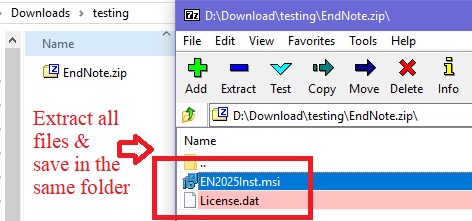
- Please save all files in the same folder/directory.
- Run the "EN2025Inst.msi" file and then follow the screen prompts to proceed with the installation.
- Please create your own account with TWC College email (@twc.edu.hk) and log in EndNote.
Guides and TrainingsThis video --How to use EndNote 2025 in three minutes (Windows)-- provides a quick guide to key EndNote 2025 features for Windows, including creating libraries, importing references, organizing research, finding full-text PDFs, and citing sources in Microsoft Word. It offers step-by-step instructions to help streamline your workflow.
Users can also refer to the Library Guide, EndNote 2025 for detailed instructions on how to use EndNote.
Please refer to the EndNote training resources for detailed information.
 King’s Park CampusMa Kam Chan Memorial Building,
31 Wylie Road, Homantin, Hong KongMongkok CampusCheung Kung Hai Memorial Building, 90A,
and Cheung Chin Lan Hong Building, 98,
Shantung Street, Mongkok, Hong KongKwai Hing Campus8/F, Tower 1 and
16/F, Tower 2,
Kowloon Commerce Centre,
51 Kwai Cheong Road,
Kwai Chung, Hong KongTsim Sha Tsui Campus136A, Nathan Road,
Kowloon, Hong KongGeneral Enquiries:Admission Enquiries:



 ©2026 Tung Wah College Limited. All Rights Reserved.